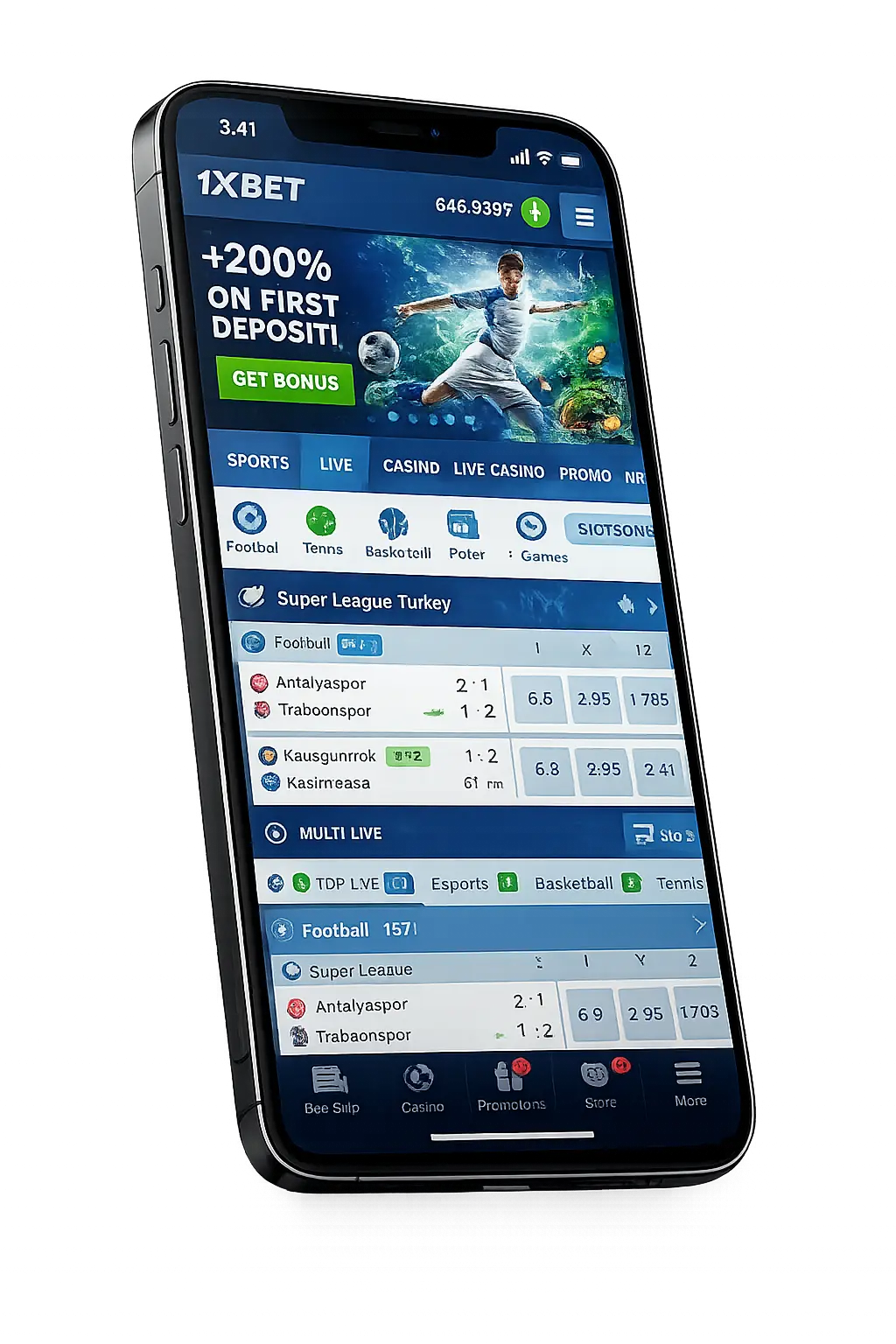
1xBet Sri Lanka app at a glance
If you came here to scan the spec sheet before scrolling, the table below covers it. The detail and the install walkthroughs sit further down.
| Operator | 1xBet Sri Lanka (1xCorp N.V., Curaçao licence OGL/2024/1262/0493) |
|---|---|
| Domain | 1xBet's own download page — not on Google Play |
| Platforms | Android APK · iOS App Store · iOS Safari PWA · Windows desktop client |
| Android version | 7.0 or higher · APK 43.9 MB (v259.1.2) |
| iOS version | iOS 15+ (App Store listing) · PWA works on iOS 11+ |
| Windows | Windows 7, 8, 10, 11 · installer ~25 MB · ~150 MB installed |
| Languages | Sinhala, English, Tamil, Hindi + 60 more |
| Cashier | LKR 300 min · iPay, Commercial Bank, Sampath Vishwa, HNB, eZ Cash, FriMi, mCash, banks, cards, AIRTM, crypto |
| Welcome bonus | 120% sports up to LKR 50,000 OR casino LKR 550,000 + 150 FS on first deposit (code LK26X) |
| Min deposit / withdrawal | LKR 300 / LKR 400 on wallet rails |
| Cost | Install is free across all four platforms |
| Restrictions | 18+ only · KYC required before first withdrawal |
The rest of the page goes deep on each install path, the permissions the app asks for, how the bet slip behaves on Dialog vs Mobitel data, and the five problems that catch out new Sri Lankan accounts most often. Use the table of contents above to jump.
1xBet APK for Android
Play Store policy blocks gambling apps for the South Asia region, so 1xBet ships the Android build as an APK from its own download page. The build we tested on 15 October 2026 (1xbet-prod-v259.1.2) weighs 43.9 MB. Total time start-to-first-login: under five minutes on a half-decent connection.
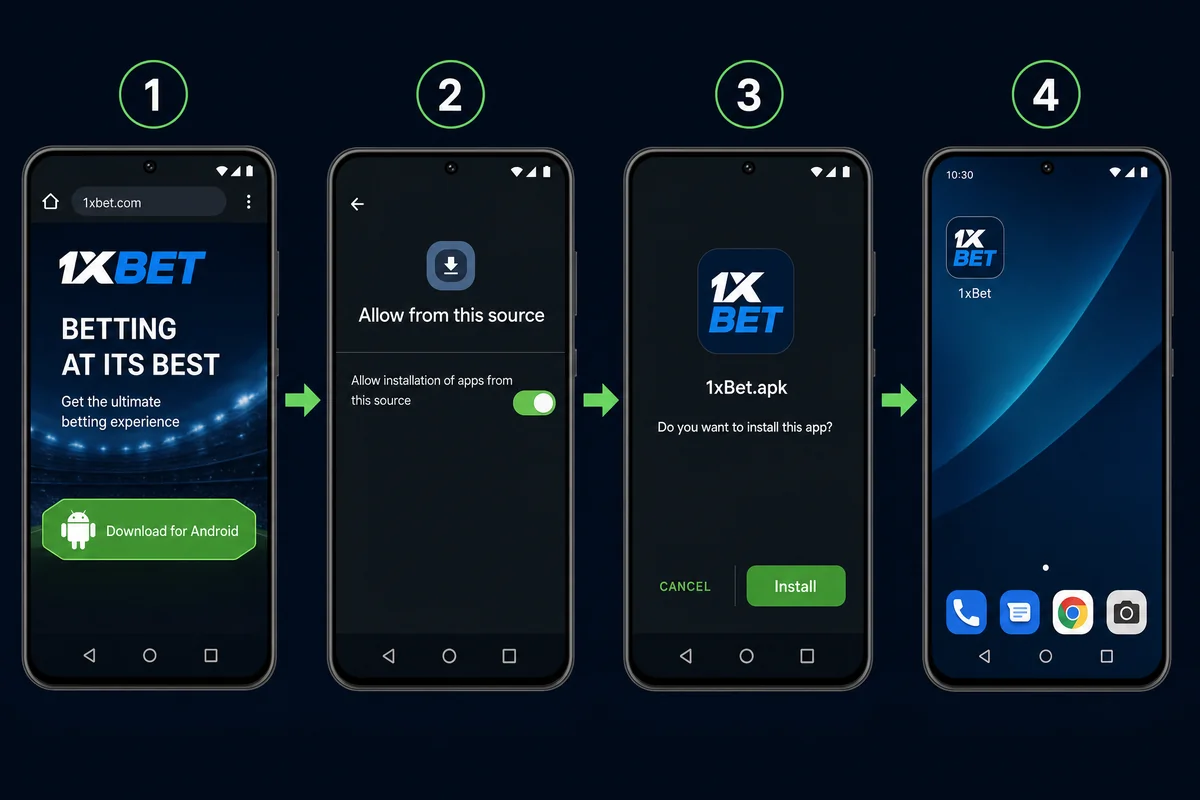
The five-minute walkthrough
-
Open the 1xBet mobile site on your phoneChrome works best. Tap the green Download badge on the homepage or scroll to the footer link "Mobile Applications".
-
Tap the Android iconThe APK starts downloading to /Download. Chrome shows a small notice — "This type of file can harm your device" — that's a generic warning Google attaches to any APK pulled outside Play. Tap "Download anyway".
-
Open the fileWhen the bar finishes, the notification tap takes you to the install prompt. If you skip it, find the APK under Files → Downloads and open it from there.
-
Allow the install sourceModern Android (8+) asks per-app: "Allow Chrome to install unknown apps". Toggle it on. The prompt only appears the first time you install an APK from that browser.
-
Hit Install~30 seconds. The app icon lands on your home screen. Login keeps you signed in for 30 days unless you log out manually.
If your phone runs MIUI, ColorOS, OxygenOS or any of the heavier Chinese skins, the "allow unknown sources" prompt sits in a slightly different spot — see the brand-specific notes below.
Brand-specific quirks for Sri Lankan phones
Singer, Damro, Daraz and the mobile shops on Galle Road sell phones from a handful of dominant brands. Each ships its own Android skin with slightly different security prompts:
| Brand / skin | Where "unknown sources" lives | Extra step |
|---|---|---|
| Samsung One UI | Settings → Biometrics & security → Install unknown apps | None — toggle and install |
| Xiaomi MIUI / HyperOS | Settings → Privacy protection → Special permissions → Install unknown apps | MIUI Optimization is sometimes blamed; leave it on, it's fine |
| Realme realme UI | Settings → Password & security → System security → More security settings → Install unknown apps | None |
| OPPO ColorOS | Settings → Additional settings → Security & emergency → Install unknown apps | None |
| Vivo Funtouch / OriginOS | Settings → More settings → Permissions & privacy → Install unknown apps | None |
| Tecno HiOS / Infinix XOS | Settings → Security → Install unknown apps | Disable "App auto-scan" temporarily during install if it flags the APK |
| Honor MagicOS | Settings → Security → More settings → Install apps from external sources | None |
| Stock Android (Pixel, Nokia, Motorola) | Settings → Apps → Special access → Install unknown apps | None |
Tecno and Infinix dominate the budget shelf in Sri Lanka — both ship with built-in security scanners that occasionally flag the APK. Disable "App auto-scan" in the security app while installing, then turn it back on after the install finishes.
Confirming the APK is legitimate
Several phishing sites mimic 1xBet branding to push malware. Three checks before you tap Install:
- URL host. The file should come from 1xBet's own domain. A file from a chat group, a .tk or .ml domain or a free file host is suspect, and its SHA-256 will not match the value in our test log below.
- File size. 43.9 MB (46,041,544 bytes) for v259.1.2, the build we tested. A file far off that size for the same version is not the genuine APK.
- Package name on install prompt. The prompt shows org.xbet.client1. Anything else — close out, delete, redownload.
1xBet for iPhone — App Store, region switch, PWA
Apple's App Store policy differs from Google's. The 1xBet app does appear in some regions; in others, the listing is hidden. Sri Lankan App Store accounts sometimes see it, sometimes don't — Apple changes this without notice. Below are three install paths, in order of how clean they leave your iPhone.
Route 1 — search the App Store first
-
Open App StoreSearch "1xBet"
-
Verify developer"1XCorp N.V." is the legitimate publisher
-
GetFace ID confirms, install begins
-
OpenDone in ~3 minutes
If the listing doesn't appear, your Apple ID region is the blocker — Apple filters gambling app visibility by ID region, not by your IP location. Move to Route 2.
Route 2 — Apple ID region switch (Cyprus or Nigeria)
This is the path most Sri Lankan iPhone users end up taking. You temporarily change your Apple ID country to one where 1xBet is listed, install the app, then change back. No payment method is required during the switch.
-
Sign out of your current Apple IDSettings → [your name] → Sign Out. Choose to keep a local copy of your data.
-
Create a new Apple ID with Cyprus or Nigeria as countryGo to appleid.apple.com on Safari, create a fresh ID. Set Cyprus, leave the payment method as "None" — it's allowed for new accounts.
-
Sign in with the new ID on App Store onlyStay signed in to iCloud with your original ID; only swap the App Store / iTunes ID. Settings → App Store → Apple ID.
-
Search and install 1xBetThe listing appears in the Cyprus catalogue. Tap Get, install completes.
-
Swap back to your main Apple IDAfter install, sign out of the Cyprus ID and sign back into your main. The app stays installed and works.
Updates require the Cyprus ID to be signed in again. Most users find it easier to switch the App Store ID just for the update, then swap back.
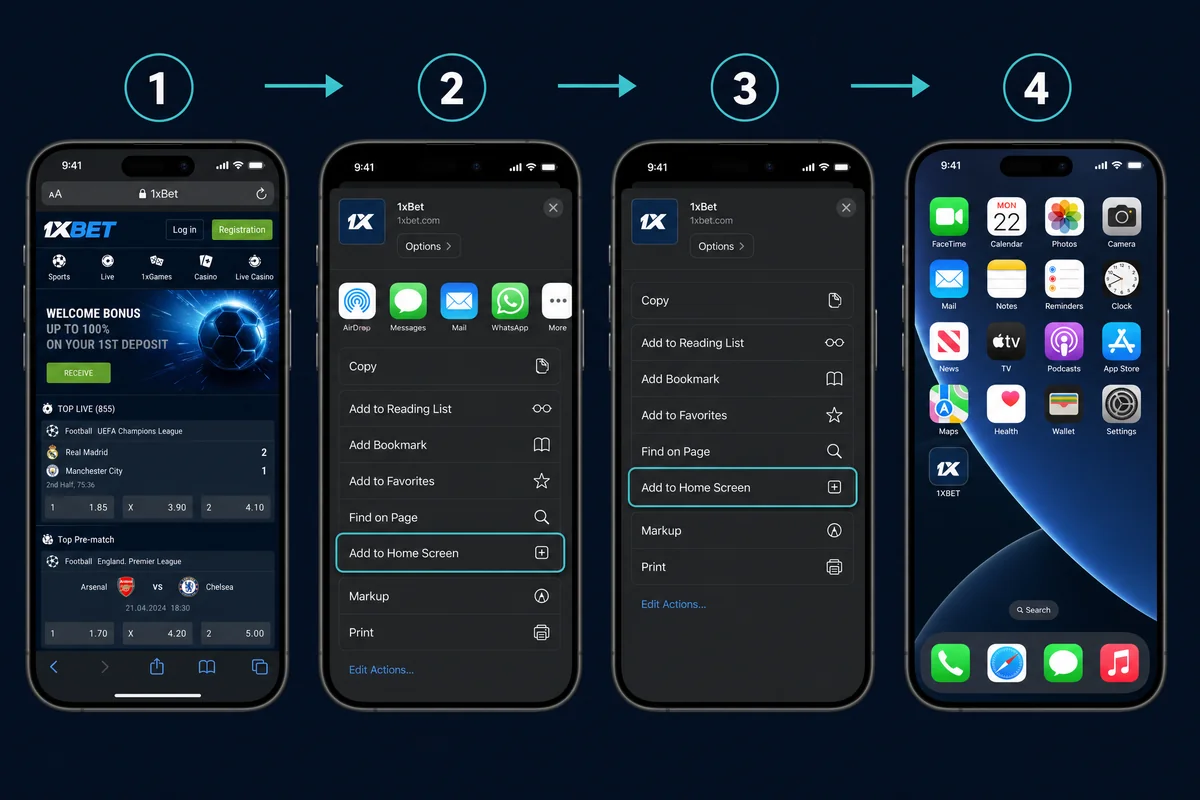
Route 3 — Safari PWA (no Apple ID juggling)
The cleanest path if you don't want to touch your Apple ID. The PWA installs as a home-screen icon and runs full-screen — the difference from a native app is minimal. Face ID login, push notifications, and offline cache all work.
-
Open in Safari1xBet mobile site
-
Share menuSquare-with-arrow at the bottom
-
Add to Home ScreenScroll down the share sheet
-
Confirm name"1xBet" works; rename if you want
The PWA installs in under 10 seconds and uses ~5 MB of storage. The first launch downloads about 30 MB of assets to cache. After that, page loads inside the PWA are 30-40% faster than mobile Safari.
After install — the trust prompt
If you installed via the App Store, the app launches straight away. If you installed via a TestFlight or enterprise distribution route (rare for 1xBet, but it happens during App Store gaps), iOS shows a "Developer Not Trusted" prompt the first time you tap the icon. Fix it under Settings → General → VPN & Device Management → 1XCorp N.V. → Trust. Without that step, the app refuses to open.
1xBet Windows desktop app
The Windows client suits two types of players: live-cricket fans who want one monitor on the stream and another on the bet slip, and high-roller casino players who run multi-table sessions across providers. The client weighs 25 MB on download and unpacks to ~150 MB. Signed installer, no Defender warnings.
-
Open on PCFooter link "Mobile Applications"
-
Pick WindowsTab next to Android badge
-
Download installer~25 MB EXE, signed
-
Run, pinPin to taskbar for one-click
The desktop build excels at side-by-side workflows: cricket stream open in one window, live bet slip in another, Aviator running on a third tab. Mouse-driven cashout is faster than touch — useful if you cash out at exact multipliers rather than letting auto-cashout fire.
System requirements and supported devices
1xBet keeps the floor low so anyone with a phone bought in the last six years can use it. The actual minimum is generous; the recommended spec gives you smooth in-play betting during LPL semifinals when odds shift two times per second.
| Platform | Minimum OS | Min RAM | Storage free | Processor floor |
|---|---|---|---|---|
| Android APK | 7.0 (Nougat) | 2 GB | 200 MB | 1.2 GHz quad-core |
| iOS App / PWA | iOS 15 (PWA: iOS 11) | 2 GB | 250 MB | A12 Bionic or newer |
| Windows desktop | Windows 7 SP1 | 4 GB | 1 GB | 2.0 GHz dual-core |
If your phone is sold widely in Sri Lankan retail, the app runs without trouble. Tested device list from the SL mass-market shelf:
- Samsung — Galaxy A05/A15/A25/A55, M14, S22/S23/S24, A series sold via Singer and Damro
- Xiaomi/Redmi — Redmi 12/13/14, Redmi Note 12/13 Pro, POCO X6, Mi 13/14
- OPPO — A18, A38, A60, A78, Reno 10/11
- Vivo — Y17s, Y28, Y36, Y100, V29, V30
- Realme — C53, C65, Narzo 70, 12 Pro+
- Tecno — Spark 20, Camon 30, Pova 6 — popular on the Singer/Damro budget shelf
- Infinix — Hot 40, Note 40, Smart 8 — high-volume on Daraz
- Apple — iPhone 11 and up (iPhone X if running iOS 15+)
First launch — what to set
The app opens to a generic welcome screen. The decisions you make here lock for a long time — currency, language, biometric login, and notification opt-in. Worth pausing to set them right rather than tapping through.
- Currency. The app reads your IP and defaults to LKR for Sri Lankan accounts. Verify before signup — the platform binds currency to the account and won't switch it later.
- Language. The header switcher offers Sinhala, Tamil and English. Pick Sinhala if you bet primarily in cricket — match commentary, market names and player props read more naturally.
- Biometric login. Settings → Security → Biometric. The app uses Android's BiometricPrompt API (fingerprint or face) and iOS Face ID / Touch ID. Adds a 30-day login window — after that, password again.
- Push opt-in. The first prompt asks for notifications. Opt in for live odds and event-start alerts; the app respects "do not disturb" hours you set in your phone OS. Decline if you bet rarely and don't want the distraction.
After the first round of choices, the welcome banner offers the bonus track decision. Sport (120% up to LKR 50,000) or casino (LKR 550,000 + 150 FS on the first deposit). The choice locks at first deposit and the platform doesn't switch tracks afterward.
1xBet app details
Technical sheet of the Android file we downloaded from 1xBet's official download path on 15 October 2026, plus the iOS listing data.
Basics
- Developer
- 1xBet
- Category
- Sports betting (real money)
- Rating
- Adults only, 18+
- Price
- Free
Android file
- File
1xbet.apk- Version
- 1xbet-prod-v259.1.2
- Version code
- 25901002
- Size
- 43.9 MB (46,041,544 bytes)
Technical
- Package
org.xbet.client1- Android
- 7.0 or higher (API 24)
- Target API
- 37
- Architecture
- arm64-v8a / armeabi-v7a
Safety
- Signature
- APK Signature Scheme v2/v3
- Permissions
- 39 declared
- Distribution
- 1xBet download page, not Google Play
- iOS
- 1XCorp N.V., iOS 15+, not in the Sri Lankan App Store
The iOS figures come from Apple's App Store listing (version 259.0, released 14 October 2026). The app is not listed in the Sri Lankan storefront, which is why most iPhone users here add 1xBet as a web app from Safari.
Is the 1xBet APK safe to install?
Yes, if the file is the one 1xBet signs. Three checks settle it, and none of them needs trust in us or in any download page.
- Signer certificate. Every genuine 1xBet build is signed with the same certificate. Its SHA-256 fingerprint is in the box below. A rebuilt or modded APK cannot carry this signature.
- File fingerprint. The SHA-256 of the file changes with every release. Ours matches the v259.1.2 build we downloaded on 15 October 2026.
- Package name. The install prompt must show
org.xbet.client1. Anything else is a different app. - Why not Google Play? Google Play does not list real-money betting apps in Sri Lanka, so 1xBet ships the Android build as a file. That is why the checks above matter.
Avoid APK files from Telegram or WhatsApp groups, file-sharing sites and pages offering "mod" or "hack" builds. Turn the unknown-sources permission back off after you install.
Verify the SHA-256 yourself
ccb9b776b386bff914b636bebdceef38abf701363d30bb9e073c3fba7c86937b4941cdb812588636e8d86b9a56ee8a0a2e6eb32baf3788859d7e97ce3257652aRun one command on the downloaded file:
If the file hash differs, check the version first: a newer build has a new hash. The certificate fingerprint is the check that holds across versions; Android itself refuses to update the app over a file signed with a different certificate.
The button opens 1xBet's own download page. Check the SHA-256 above after the download.
1xBet Android permissions: what each one does
We read the AndroidManifest of the v259.1.2 file: it declares 39 permissions. Android asks for the sensitive ones (location, camera, microphone, notifications) at run time, so you can refuse them and still bet.
| Group | Permissions in the manifest | What 1xBet uses it for | Our advice |
|---|---|---|---|
| Network | INTERNET, ACCESS_NETWORK_STATE, ACCESS_WIFI_STATE | Odds, live data, payments | Required |
| Location | ACCESS_FINE_LOCATION, ACCESS_COARSE_LOCATION | Country check for the licence and offers | Allow "only while using the app" |
| Camera & audio | CAMERA, RECORD_AUDIO, MODIFY_AUDIO_SETTINGS, USE_SIP | KYC selfie and document scan, voice calls to support | Deny until you do KYC, then revoke |
| Storage & downloads | READ_EXTERNAL_STORAGE, WRITE_EXTERNAL_STORAGE, ACCESS_ALL_DOWNLOADS | Cache, document upload, in-app update file | Limit to selected photos where Android allows |
| Self-update | REQUEST_INSTALL_PACKAGES | Installs new 1xBet versions without a store | Approve updates only from inside the app |
| Phone state | READ_PHONE_STATE, READ_PRIVILEGED_PHONE_STATE, GET_TASKS | Device and session identification | Can be denied; login still works |
| Biometrics & accounts | USE_BIOMETRIC, USE_FINGERPRINT, USE_CREDENTIALS | Fingerprint or face login | Optional; keep a screen lock |
| Alerts & background | POST_NOTIFICATIONS, RECEIVE_BOOT_COMPLETED, SCHEDULE_EXACT_ALARM, FOREGROUND_SERVICE, FOREGROUND_SERVICE_DATA_SYNC, WAKE_LOCK, VIBRATE, c2dm.RECEIVE, client1.PROCESS_PUSH_MSG, client1.PUSH_PROVIDER, client1.DYNAMIC_RECEIVER_NOT_EXPORTED_PERMISSION | Push alerts, match reminders, keeping live sessions awake | Turn off the alerts you don't need |
| Overlay & sensors | SYSTEM_ALERT_WINDOW, HIGH_SAMPLING_RATE_SENSORS | Floating video window, motion input in some games | Revoke "Display over other apps" if unused |
| Ads & attribution | ACCESS_ADSERVICES_AD_ID, ACCESS_ADSERVICES_ATTRIBUTION, gms.AD_ID, BIND_GET_INSTALL_REFERRER_SERVICE | Install attribution for marketing partners | Reset or delete your advertising ID in settings |
| Vendor services | providers.gsf.READ_GSERVICES, huawei.appmarket GET_COMMON_DATA, samsung.mapsagent READ_APP_INFO | Google, Huawei and Samsung service hooks | No action needed |
Revoke any of these later in Settings → Apps → 1xBet → Permissions.
1xBet app welcome bonus
The mobile bonus catalogue mirrors the web version one-for-one. Same welcome split, same wagering terms, same time windows. The app adds a few promotions you won't see on the desktop site — push-driven free-spin drops, app-only LPL accumulator boosts during the playoff weekend, and a deposit-back guarantee on first-time mobile deposits.
Locking the welcome bonus from the app
-
Tap RegisterTop-right of the home tab. The signup form takes phone or email.
-
Set Sri Lanka + LKRThe country selector defaults from your IP. Verify before submitting.
-
Enter LK26X in the promo fieldTap the small "+" beside the password row to expand the promo input.
-
Pick Sport or CasinoRadio toggle — Sport (120% sports up to LKR 50,000) or Casino (LKR 550,000 + 150 FS on first deposit).
-
Make your first depositLKR 300 minimum across all rails. The bonus credits within one minute of deposit clear.
Track your bonus progress under Account → My Bonuses. The wagering bar updates after each settled bet on sports, and after each spin in the casino. Slot wagering counts at 100%, live dealer at 10%, table games at 5%.
1xBet app sportsbook — LPL and live cricket
Cricket is the reason most Sri Lankan accounts open. The app's cricket tab leads with LPL during season, switches to Asia Cup or T20 World Cup in their respective windows, and never drops the Sri Lanka national team series from the featured row.
🏏Cricket in the app
LPL · Asia Cup · SL nationalThe cricket tab leads the home screen during the LPL window — outright lines stay live from morning toss, player-prop boards open about four hours before play, and push alerts for wickets and milestones land on the lockscreen. Biometric quick-bet shaves a couple of seconds off mid-over slip confirmation, which matters when LPL odds tick every 2-3 seconds.
- Lanka Premier League (LPL)
- SL national bilateral series — Tests, ODI, T20I
- Indian Premier League (IPL)
- Asia Cup & T20 World Cup
- SLC Major Tournament + inter-provincial
- Big Bash League (BBL), CPL, PSL
⚽Football in the app
EPL · UCL · AFC Asian CupChampions League midweek nights and EPL weekends dominate the football tab. The app holds 150+ live markets per top European fixture, with push alerts for goals and red cards routed to your lockscreen. Live streams for selected fixtures play inside the app on 4G, and the bet slip locks under 600ms even on Dialog cell-data outside Colombo.
- English Premier League
- UEFA Champions League · Europa League
- FSL Super League (Sri Lanka)
- La Liga · Bundesliga · Serie A
- AFC Asian Cup & World Cup qualifiers
- Copa Libertadores & MLS
🏀Basketball in the app
NBA · EuroLeague · FIBANBA games tip off at SL morning hours, and the in-play board opens about 60 seconds after the first tip — quarter-by-quarter handicaps and player props refresh in real time. Push alerts for milestone scorers and lead changes pair well with biometric quick-bet for thumb-on-screen accumulator stacking during commercial breaks.
- NBA (regular season + playoffs + Finals)
- EuroLeague
- FIBA Asia Cup & FIBA World Cup
- NCAA March Madness
- Olympic basketball
- WNBA
🎾Tennis in the app
ATP · WTA · Grand SlamsGrand Slam weeks fill the tennis tab from late January through September. The app pushes set-result alerts to your lockscreen, and the in-play board ticks every point — useful when the toilet break momentum swing arrives. Mobile streams cover most ATP 500 and Grand Slam matches on a funded account.
- ATP Tour & WTA Tour
- Australian Open, Roland Garros, Wimbledon, US Open
- Davis Cup & Billie Jean King Cup
- ATP Finals & WTA Finals
- Challenger and ITF Tour
- Olympic tennis
🎮E-Sports in the app
Live 24/7The e-sports tab runs around the clock, and round-by-round Counter-Strike markets refresh as kills land. The app keeps Twitch-quality streams inside the same view as the bet slip, so map-handicap and first-blood positions confirm without an app switch. Asian late-night tier-2 events fill SL prime-time hours.
- CS 2 (Counter-Strike 2)
- Dota 2 — The International + DPC
- League of Legends — LCK, LPL, LEC, LCS
- Valorant — VCT & regional leagues
- EA FC and FIFA esports
- Mobile Legends, PUBG Mobile, King of Glory
🥊MMA & Boxing in the app
UFC fight nights · ONEUFC main and prelim cards land in SL morning hours, and the app pushes alerts for fight-start and round-end events. Method-of-victory and round-betting boards stay live through each round, and biometric quick-bet handles the rapid stake-up after a fight-changing knockdown. ONE Championship's Asian schedule fits SL evening windows.
- UFC main + prelim cards
- ONE Championship
- PFL · Bellator
- Top Rank Boxing · Matchroom · PBC
- Riyadh Season cards
- Olympic boxing
Less popular sports — table tennis, snooker, darts — hold pre-match-only odds with shallower markets, but they still sit one tap from the home screen.
1xBet casino app — Aviator and live dealer
The casino tab pulls 7,000+ slot titles plus live dealer rooms plus crash games into one filterable view. Mobile-optimised loaders keep first-spin time under three seconds on any provider, including Pragmatic Play and NetEnt megaways titles that ran heavy on older mobile builds.
🎰Slots in the app
7,000+ titles · 100+ providersMobile-optimised loaders keep first-spin time under three seconds across providers, including the heavy Pragmatic Play and NetEnt megaways titles that lagged on older Android builds. Filters for RTP band, volatility tag and feature flags (megaways, buy-bonus, hold-and-win) sit at the top of the slots tab, and the search bar accepts both English and Sinhala titles.
- Gates of Olympus (Pragmatic Play, 96.5% RTP)
- Sweet Bonanza & Sweet Bonanza 1000
- Sugar Rush 1000
- Big Bass Bonanza series
- Starburst, Gonzo's Quest (NetEnt)
- Book of Dead (Play'n GO)
✈️Crash games in the app
Aviator + the crash rowSpribe's Aviator headlines the crash row with a one-tap cashout button sized for thumb reach — identical to desktop, but the round timer and history sit above the bet field. Two-bet mode (two stakes on one round), auto-cashout, auto-bet and full bet history all carry over. Three-to-thirty second rounds slot neatly between LPL overs on TV.
- Aviator (Spribe, 97% RTP, LKR 50–30,000)
- Lucky Jet (Gamzix) — early-bird first-second bonus
- JetX (Smartsoft) — round history open by default
- Speed-n-Cash (Popok) — two-lane hedge bets
- JetX3 & Cash-Show
- Aviatrix
🃏Live dealer in the app
Evolution · Pragmatic Live · EzugiEvolution, Pragmatic Live, Ezugi and BetGames stream to the mobile app the same way they stream to desktop, with vertical-mode layouts on Teen Patti rooms putting the bet slip below the dealer feed — no horizontal rotation. Stream resolution adapts to bandwidth, so the feed holds up on Dialog or Mobitel 4G outside Colombo.
- Lightning Roulette (Evolution)
- Crazy Time (Evolution)
- Teen Patti (Ezugi)
- Speed Baccarat (Evolution + Pragmatic)
- Blackjack tables (Evolution Classic + Pragmatic)
- BetGames TV shows
🎡Game shows in the app
Crazy Time · Monopoly · Funky TimeEvolution's game-show floor (Crazy Time, Monopoly Live, Funky Time, Mega Wheel) streams full-bitrate to the app, and the bet board reflows for portrait phones — chips and the multiplier wheel both stay one thumb away. Round breaks run 30-60 seconds so the app's push alerts make sure you're back for the spin.
- Crazy Time (Evolution)
- Monopoly Live (Evolution)
- Funky Time (Evolution)
- Mega Wheel (Pragmatic Live)
- Dream Catcher (Evolution)
- Cash or Crash (Evolution)
Deposits and withdrawals from the app
The cashier inside the app is the same engine as the web, with one mobile-specific improvement: wallet and rail apps (iPay, eZ Cash, mCash, FriMi, Commercial Bank Digital, HNB SOLO) push a deep-link confirmation back into 1xBet, so the deposit completes without you switching apps twice.
-
Tap the Deposit badgeTop-right green button across every screen of the app.
-
Pick a Sri Lankan walletiPay, Commercial Bank, Sampath Vishwa, HNB and eZ Cash sit at the top. Other banks, FriMi, mCash, cards and crypto below.
-
Authorise inside your wallet appA push lands in eZ Cash / FriMi. Approve there, you return to 1xBet automatically.
-
Balance updatesWallet deposits land in under a minute. Bank rails take longer.
Withdrawal flow follows the same shape. The app remembers the last-used method, so a repeat cash-out is two taps and a Face ID confirmation.
Keeping the app updated
The app self-checks for a newer build at every launch. If a patch waits, the splash screen shows an "Update available" badge and a one-tap install. The flow differs by platform:
- Android APK. A fresh APK downloads inside the app's update prompt. Tap "Install" — your existing data stays, the app rebuilds in about 30 seconds.
- iOS App Store. Standard App Store update flow. If you region-switched to install, sign back into the Cyprus Apple ID to update, then swap back to your main.
- iOS PWA. Updates happen silently in the background — the service worker swaps assets on next launch. No prompts.
- Windows desktop. Auto-update runs on launch, no user action needed.
Update frequency averages every 2-3 weeks. Major releases (new market types, design refreshes) land monthly; security patches drop sooner if needed.
1xBet app on Dialog, Mobitel and Hutch
Sri Lankan networks differ by tower density, peak-hour congestion and bundle structure. Below is how the app performs on each carrier, tested across Colombo Fort, Galle, Kandy and Jaffna. Bet slip latency means the time between you tapping confirm and the server acknowledging the bet — under 500ms is fine, over 1.5s is uncomfortable.
| Carrier | Bet slip latency | Live odds refresh | Streaming stability | Data per hour live |
|---|---|---|---|---|
| Dialog 4G | ~280ms | 2 sec ticks | Strong, rare buffering | ~45 MB |
| Dialog 5G | ~140ms | 1 sec ticks | Studio-quality stream | ~60 MB |
| Mobitel 4G | ~310ms | 2 sec ticks | Stable urban, occasional drops outside | ~50 MB |
| Mobitel 5G | ~180ms | 1 sec ticks | Strong | ~65 MB |
| Hutch 4G | ~420ms | 3 sec ticks | Adequate for casino, occasional lag on live | ~40 MB |
| SLT-Mobitel home fibre | ~90ms | 1 sec ticks | Best stream quality | n/a (unmetered) |
Data usage above covers in-play betting plus the live odds feed without streaming. Adding a live stream pushes a 90-minute LPL match to about 350 MB on standard quality, 500-600 MB on HD. If your bundle is tight, drop stream quality to SD inside the player settings — saves about 40% of the data without making the picture unwatchable.
One performance quirk worth knowing: between 7-9 PM weeknights, every Sri Lankan network sees peak load. The odds feed refresh slows by 30-50% during that window. The app handles it cleanly — the bet slip still locks at the price you saw — but the visual ticking lags.
1xBet app vs PWA vs browser vs Windows
Four ways to reach the same product. Which one suits depends on your phone, your data plan, and whether you bet across multiple events at once.
| Aspect | Android APK | iOS PWA | Mobile browser | Windows desktop |
|---|---|---|---|---|
| Install footprint | ~140 MB | ~30 MB | 0 | ~150 MB |
| Login persistence | 30 days | 30 days | Session-based | 30 days |
| Push notifications | Yes | Yes (iOS 16.4+) | No | Yes (system tray) |
| Biometric login | Yes | Yes | No | Windows Hello |
| Live streaming | Yes | Yes | Yes | Yes (best quality) |
| Multi-tab betting | No | No | Limited | Yes — separate windows |
| Data efficiency | Best | Good | Worst (no cache) | n/a Wi-Fi |
| Update process | In-app prompt | Silent | n/a | Auto |
| Best for | Daily users on data plans | iPhone owners avoiding region switch | Occasional play, no install | Live-streaming + multi-event |
Most users settle on Android APK or iOS PWA after the first month. The browser fits one-off play; the Windows client fits dedicated live-cricket sessions.
Troubleshooting — five common issues
From a year of customer support tickets, here are the issues that hit new Sri Lankan accounts most often, with the fixes that resolve them inside 60 seconds.
1. APK installs but won't open on Android
Almost always a WebView problem. The app depends on Android System WebView; if you've disabled it under Settings → Apps → System apps, the 1xBet APK crashes on launch. Fix: enable WebView, restart phone, relaunch the app. If WebView is missing entirely on stock Android 7-9, update Android System WebView from Google Play.
2. Login fails on iPhone after a region switch
Cyprus Apple ID for install + Sri Lankan ID for everything else creates a cookie/keychain conflict. The app sometimes pulls the wrong country code. Fix: open Settings → Safari → Advanced → Website Data, search "1xbet", delete. Restart the app, log in again. Persists from that point.
3. Bet slip stuck on "Loading…"
Stale odds feed cache. Pull down to refresh the live tab; if that doesn't clear, force-close and reopen. On Android: Settings → Apps → 1xBet → Storage → Clear Cache (not Clear Data — that wipes your login). The bet slip rebuilds against fresh odds on next open.
4. Cashier shows USD instead of LKR
Your account currency is correct, but the cashier reads the device locale on first open. Fix: Settings → Language & Region inside the app → set to en-LK or si-LK. The cashier reloads with LKR amounts. If the option is missing, log out and log back in — that re-pulls the account currency from server.
5. Push notifications never arrive
Two layers to check. First, the app's own toggle (Settings → Notifications → Push). Then your phone's notification policy for the app — battery optimisation kills background notification listeners. Add 1xBet to "never optimise" on Android (Settings → Battery → Battery optimisation → 1xBet → Don't optimise). On iOS, allow notifications under Settings → Notifications → 1xBet.
1xBet tested by our team
What we measured ourselves for this update, and what we left to your account screen.
Test log
- Team
- 1xbet-sri.com review team
- Date
- 15 October 2026
- Source
- 1xBet official download path
- Version
- 1xbet-prod-v259.1.2
- Size measured
- 43.9 MB
- SHA-256
- ccb9b776b3…86937b
- Verdict
- 4.4 / 5
What we checked
- Downloaded
1xbet.apkand hashed it with SHA-256. - Read the AndroidManifest: package, minimum Android, target API, 39 permissions.
- Extracted the v2/v3 signing block and fingerprinted the certificate.
- Compared it with an older copy found on third-party APK pages (prod-v257.0.74): different file, same signer.
- Looked the licence up in the Curaçao Gaming Authority register and the iOS app in the Sri Lankan App Store.
Not covered by this check: Real-money deposits and withdrawals: limits come from your cashier screen. Bonus availability for your account: the offer visible after sign-up is the one that counts.
1xBet app version history
Builds we have hashed ourselves. We add a row each time we re-check the download.
- 1xbet-prod-v259.1.2Android · 43.9 MB · checked 15 October 2026Current build from the official download path. SHA-256
ccb9b776b386…, signer4941cdb81258…. - iOS 259.0iPhone · released 14 October 2026App Store build by 1XCorp N.V., requires iOS 15.0. Not listed in the Sri Lankan storefront.
- prod-v257.0.74Android · 44.9 MB · hashed 15 October 2026Older build still circulating on third-party APK pages. SHA-256
1936c31823c9…, same signer certificate. Update to the current build.
Version numbers come from the APK manifest and Apple's listing. We publish release notes only when 1xBet publishes them.
1xBet licence and operator
We looked 1xBet up in the Curaçao Gaming Authority register on 15 October 2026. The certificate is issued to the operator of 1xbet.com. It does not cover local law in Sri Lanka, so we show both sides below.
Curaçao licence
- Operator
- Caecus N.V.
- Company no.
- 163779
- Regulator
- Curaçao Gaming Authority (CGA)
- Licence
OGL/2024/1262/0493- Granted
- 07.11.2024
- Status
- Active
- iOS publisher
- 1XCorp N.V.
Sri Lanka
- Local law
- Gambling Regulatory Authority Act No. 17 of 2025, in force since 1 December 2025: online gambling needs a GRA licence
- 1xBet GRA licence
- None found as of 15 October 2026
- Blocking
- On 6 August 2026 the TRCSL ordered ISPs to block 122 unlicensed gambling sites
- Age
- 18+
The regulator is now called the Curaçao Gaming Authority. Older pages still say "Gaming Control Board" or quote the retired licence 1668/JAZ. Check the certificate through the validator linked in the footer of 1xBet's own site.
1xBet app FAQ
Where do I download the 1xBet APK in Sri Lanka?
From 1xBet's own site — the Mobile Applications link sits in its footer and side menu, and our download button leads there. Play Store blocks gambling apps for South Asia, so the APK never appears in the official store. The v259.1.2 file weighs 43.9 MB. Compare its SHA-256 with the value in our test log before you install.
Can I get the 1xBet app on my iPhone in Sri Lanka?
Three paths. App Store search may show the listing if 1XCorp N.V. has filed for your region — try this first. If not, switch your Apple ID country to Cyprus or Nigeria, install, then switch back. No card method required during the switch. The third path is a Safari PWA via Share → Add to Home Screen.
Does the app run on Dialog and Mobitel data?
Yes — on both 4G and 5G. The bet slip uses about 45-50 MB per hour of live cricket on Dialog 4G, less on 5G. Aviator runs at ~8 MB per 30-minute session. Live streaming a full LPL match runs 300-400 MB on standard quality, 500-600 on HD.
What bonuses are available through the app?
Same as web — 120% sports first deposit up to LKR 50,000, or casino Welcome Bonus LKR 550,000 + 150 Free Spins on the first deposit. Min deposit LKR 300. The app adds push-only promotions: app-exclusive free spin drops and early-bird LPL accumulator boosts during the playoff weekend.
Is the 1xBet app free?
Yes. Install costs nothing across Android APK, iOS App Store, iOS PWA, and Windows. You only pay when you deposit, and the cashier carries zero fees on every Sri Lankan rail.
Why does the app ask for so many permissions?
Storage handles cache for bet history and slot assets. Notifications drive live odds alerts. Camera triggers only for KYC document scans. Location runs only inside the cashier for fraud checks. You can deny any permission and the app still works — only KYC needs camera, only push alerts need notifications.
What if the app crashes after install on Android?
Three checks. First, Android version 7.0 or higher. Second, 200 MB free storage. Third, Android System WebView is enabled in Settings → Apps. Reinstall after these. Login persists for 30 days on the new build.
Does the app support Sinhala?
Yes. Settings → Language → සිංහල. The cashier, bet slip, customer support chat and bonus pages all switch. The fastest way to land on Sinhala from the start is to use the si/ URL or tap සිංහල in the header language switcher.
Responsible gaming
Two settings inside the app worth using from day one. Both sit under Account → Responsible Gaming.
- Deposit limit. Set a daily, weekly or monthly cap. The cashier blocks deposits over your limit. Raising the limit takes 48 hours to apply; lowering takes effect immediately.
- Session reminder. A push every 30, 60 or 90 minutes of continuous play. Useful for casino sessions where time blurs.
If betting stops being entertainment, the National Council on Drug Abuse runs a 1926 helpline that covers gambling concerns alongside drug and alcohol support. You can also self-exclude from your 1xBet account directly — Settings → Responsible Gaming → Self-exclusion sets a 6-month, 12-month, 24-month or permanent block on logging in.
Updated: 03.06.2026